

What Is Google Ads for Auto Repair Shops?
Here's a one-sentence definition of Google Ads for auto repair shops.
A system that gets your auto repair shop seen by customers on Google, earns their interest, and makes them contact you.
Just 3 steps.
-
Get seen
-
Earn interest
-
Get contacted
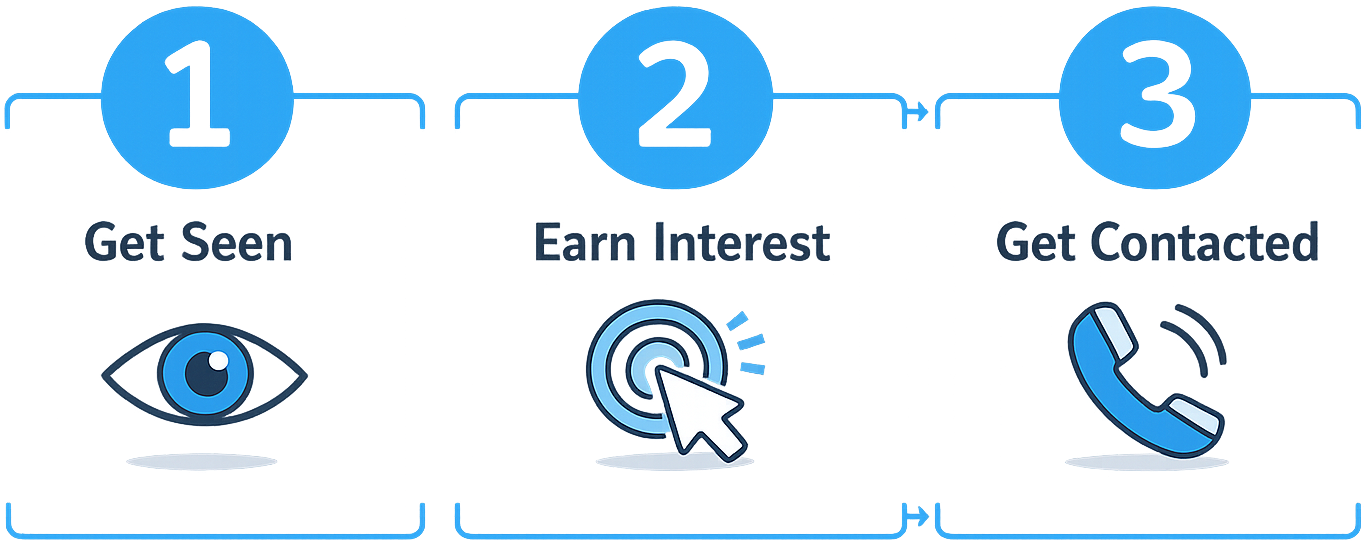
All knowledge about Google Ads ultimately comes down to one of these 3 steps. Simply understanding the basics of each step and applying them correctly is enough to see real results.
Let's go through each of these 3 steps one by one.
Step 1: Get Seen
What Is a Keyword?
Let's say a customer's car brakes are broken and they search 'brake repair near me' on Google. The 'brake repair near me' that the customer typed is what's called a keyword. Simply put, a keyword is the same thing as what a customer searches for.
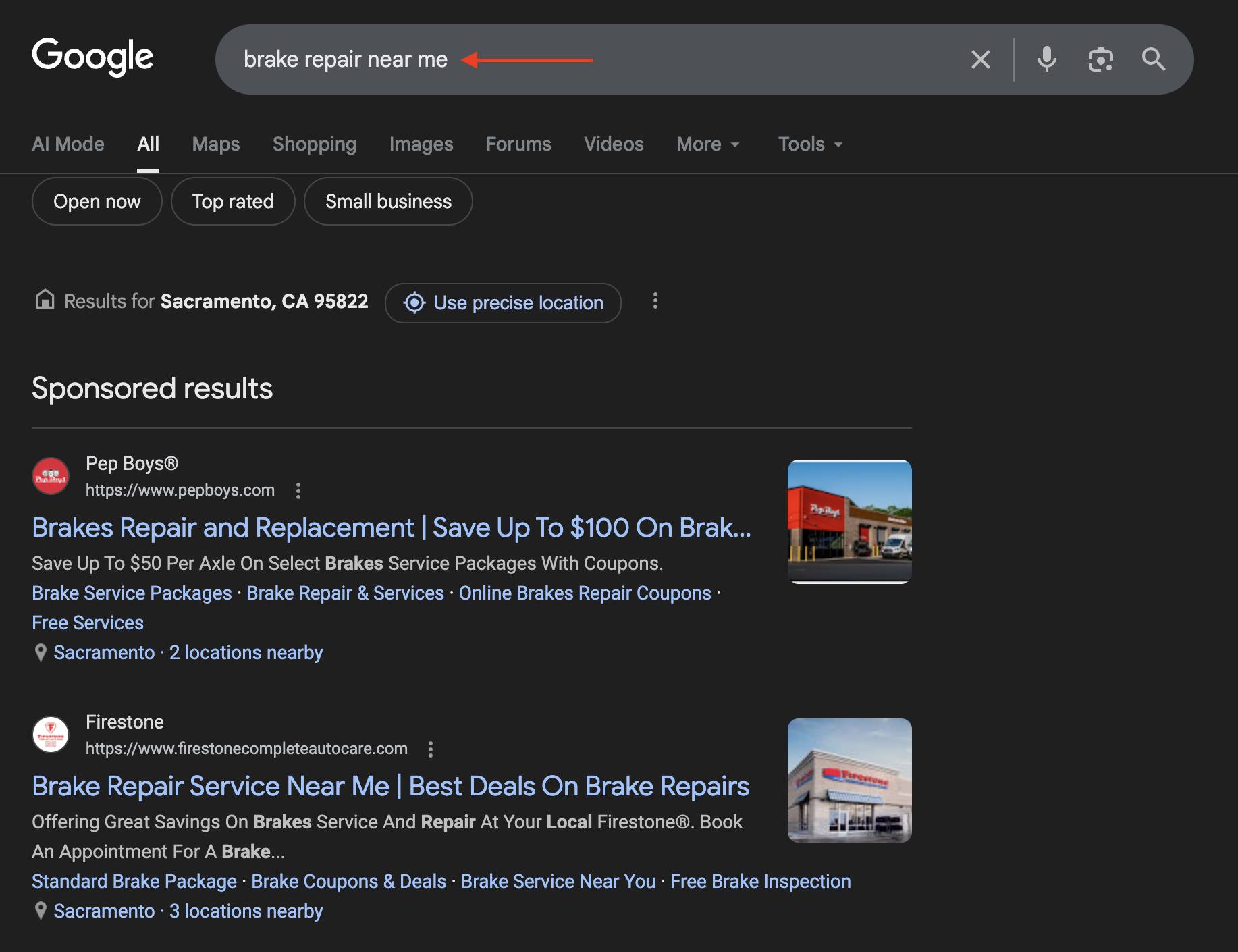
When a search happens, Google determines whether your ad contains that keyword and decides whether to show your ad in the search results accordingly.
In other words, you just need to include keywords in your ad that customers are likely to search for. For example:
-
oil change near me
-
transmission repair near me
-
car ac repair in [city]
But that's not all. The opposite work is also necessary.
What Is a Negative Keyword?
The opposite of 'including keywords customers search for' is 'excluding keywords that non-customers are likely to search for.' Take a look at these searches:
-
how to repair brake
-
mechanic hire near me
-
how much does it cost to fix transmission
People typing these searches are not customers looking for auto repair services. Someone searching 'how to repair brake' is trying to solve the problem themselves, not looking for a shop. The searcher's intent doesn't match your ad.
Keywords that are irrelevant to your ad like this are called Negative Keywords.
You might wonder:
"Aren't ads only shown when someone searches the keyword I specified? So why do I need to add negative keywords separately?"
To answer this, you need to understand how Google's keyword matching works.
Google doesn't simply match keywords set by advertisers as text strings. It uses machine learning to infer searcher intent and shows ads it judges to be 'relevant.' In fact, Google shifted Broad Match to intent-based matching starting in 2021.

That means your ad can appear for searches you never explicitly specified. Negative keywords are the safety switch that controls this automatic expansion.
The Three Types of Keyword Match
Google Ads has three keyword types:
-
Broad Match
-
Phrase Match
-
Exact Match
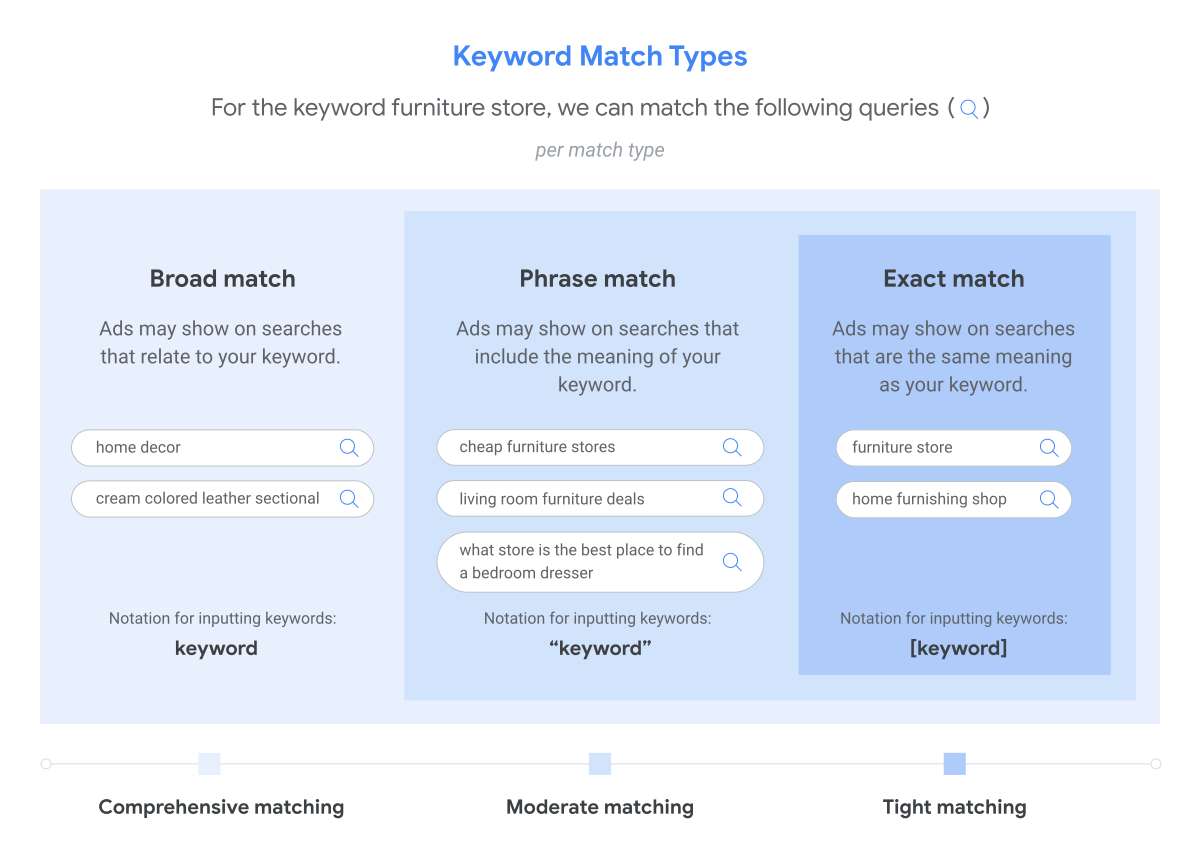
The criterion that separates these three is flexibility — how far you're willing to allow searches similar to your set keyword.
Broad Match
Broad Match (BM) is the most flexible type. You enter the keyword as-is with no symbols. Google shows your ad as broadly as possible for anything it judges to be related.
For example, setting 'brake repair near me' as BM could show your ad for searches like:
-
car brake fix
-
brake service nearby
-
mechanic near me
-
auto repair shop
These seem fine since they have similar intent, but the problem is your ad can also show for searches with completely different intent, like:
-
how to fix brake
-
brake repair cost
BM maximizes your exposure, but also increases useless clicks along with it.
Phrase Match
Phrase Match (PM) uses the keyword wrapped in quotation marks. It's less flexible than BM and only expands in front of and behind the core phrase.
For example, setting "brake repair near me" as PM could show your ad for:
-
cheap brake repair near me
-
brake repair near me open now
-
best brake repair near me
Much more precise than BM. So many people think:
"Then can't I just use PM?"
But PM still has limits like these:
-
brake repair near me toyota dealership
-
brake repair near me [different city name]
-
brake repair near me cheap/free
These are searches that look relevant but are likely not real customers, or are outside your service area, or are searchers who are overly price-sensitive. PM helps with filtering but doesn't catch everything.
Exact Match
Exact Match (EM) uses the keyword wrapped in square brackets. It's the most precise type and only shows for nearly identical searches.
For example, setting [brake repair near me] would only show for:
-
brake repair near me
-
brake repair nearby
Only cases where the meaning of the words is nearly exactly the same apply. So searches like these get missed:
-
hyundai brake repair near me
-
brake repair near me open now
-
emergency brake repair near me
These are all searches with a high likelihood of being real customers, but EM is too precise to catch these expanded searches. Unnecessary clicks are greatly reduced, but good opportunities can be missed along with them.
Which Match Type Should You Use?
Which of the three should you use? The answer depends on the situation. Strategy changes based on your ad budget, cost per click, local competition level, and search volume. Let me share a case from my actual ad management work.
Customer C's daily ad budget was $30. The average cost per click for service keywords in their area was $5, meaning they could get a maximum of 6 clicks per day. To prevent unnecessary waste, I set all keywords to EM. I thought it was a reasonable strategy to target only the people with the highest purchase intent on a small budget.
But after the ad launched, not a single call came in. When I checked the dashboard, daily impressions were fewer than 30, not a single click had occurred, and the budget hadn't been spent at all.
The cause was extremely low keyword search volume in that area. The market itself was narrow, and applying EM on top of that further reduced opportunities for the ad to show. As a solution, I added negative keywords, expanded to PM, and added more related keywords. As a result, impressions and clicks increased and calls and inquiries started coming in normally.
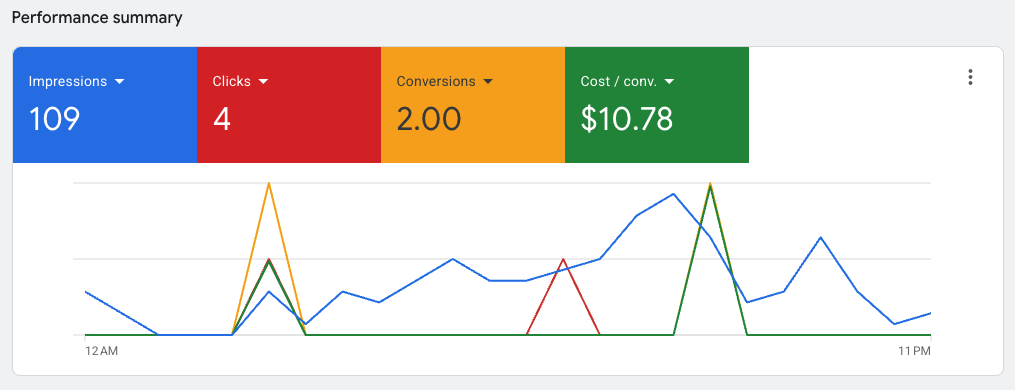
If this client had been running ads in a larger, more competitive market with a service that had more search volume, EM alone would have worked fine. Ultimately, the variable of market conditions required a change in strategy.
There is no single right answer that works in all situations for keyword match types. The most effective approach is to find the closest-to-correct answer through repeated cycles of 'hypothesis → small test → validation → adjustment' based on data.
That covers the essential knowledge you need about keywords. Next, let's look at how Google ranks ad results.
Step 2: Earn Interest
The first step was 'Get Seen' — the process up until your ad catches a customer's eye when they search.
Now comes the second step: 'Earn Interest.' Being seen isn't enough. Among competitors lined up side by side in search results, you need to make customers click on your ad. To do that, you first need to understand how Google decides ad rankings.
Google Ads Is an Auction
Your ad might show up as the #1 result, or it might sit at the very bottom of the scroll. The higher the rank, the more impressions and click-through rates go up, and the more opportunities you get to be chosen by customers.
In fact, the average click-through rate for a #1 Google ad is around 6–7%, while dropping to 4th place or lower causes it to plummet to under 1%. One position makes all the difference in traffic volume.
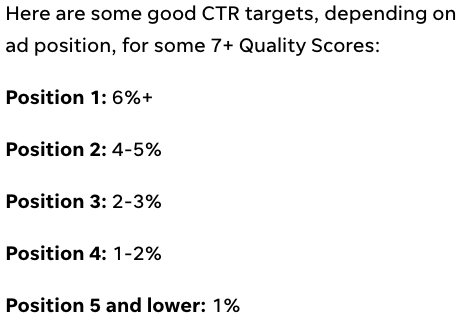
So how is this ranking determined? The bottom line is that Google Ads is not simply a structure where the person who spends the most wins.
Google Ads is an auction system. The moment a customer searches 'brake repair near me,' every auto repair shop with an ad on that keyword enters the auction simultaneously. And who rises higher is determined by Ad Rank.
What Is Ad Rank?
Ad Rank is determined by two factors: your bid and your Quality Score.
Your bid is the amount you're willing to pay when your ad keyword gets clicked. Many people think at this point:
"So if I raise my bid, won't I automatically show up higher?"
No. That's because of the other factor that makes up Ad Rank: Quality Score.
What Is Quality Score?
Quality Score is a rating of 'how relevant this ad is to the user.' It's made up of three factors:
-
CTR (Click-Through Rate) represents how often people click on this ad.
-
Ad Relevance looks at how well the searched keyword matches the ad copy.
-
Landing Page Experience evaluates how useful, fast, and relevant the page is after clicking.
Quality Score is the combined total of these three factors. One more thing worth noting: many people treat Quality Score like a scoreboard to chase, but Google describes it as a diagnostic tool.
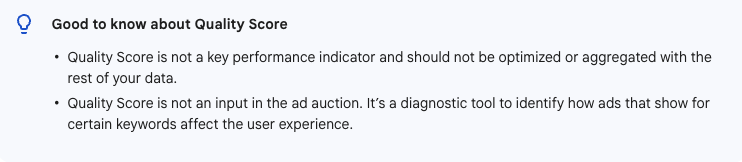
In other words, it's less about hitting a number and more about understanding why your ad is underperforming. In practice, rather than fixating on the 1–10 score itself, it's far more useful to look at which of the three components — expected CTR, ad relevance, or landing page experience — is holding you back.
How Is Ad Rank Calculated?
To understand why bid alone doesn't determine your ranking, it helps to think about how Ad Rank is roughly calculated.
Think of it this way: Ad Rank is essentially your bid combined with your Quality Score. It's not a literal equation Google runs — the actual formula is far more complex — but as a mental model, it works.
Let's look at an example.
Auto Shop A
-
Bid $10
-
Low click-through rate
-
Ad copy has low relevance to keyword
-
Landing page is slow and hard to find the call button
-
Quality Score: 1
Auto Shop B
-
Bid $6
-
High click-through rate
-
Ad copy has high relevance to keyword
-
Landing page is fast and call button is immediately visible
-
Quality Score: 10
Despite the lower bid, Auto Shop B with the higher total score is likely to show up higher.
The actual formula Google uses is far more complex than this. Google factors in not just the bid but also ad quality at auction time, ad rank thresholds, the searcher's location, device, and search context, and the expected impact of ad assets.
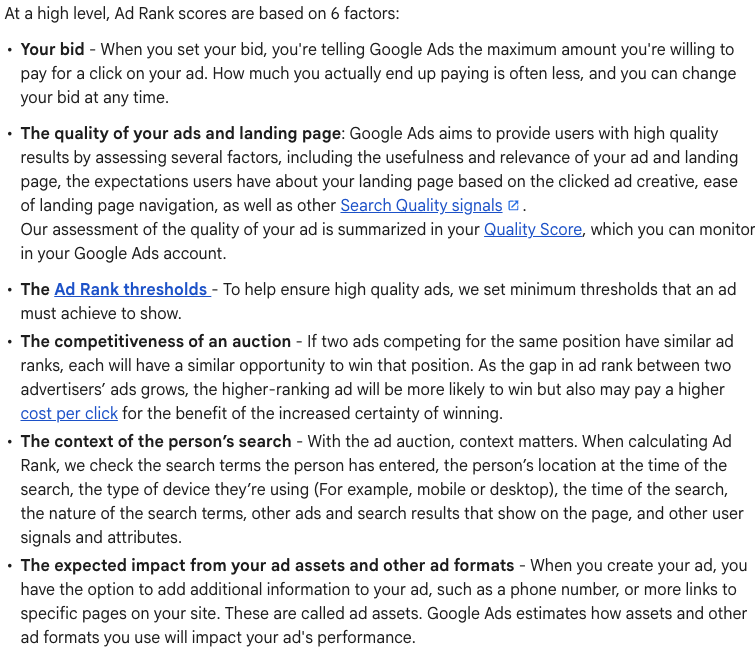
In other words, even with the same keyword, results can differ depending on who searched and in what environment. Ultimately, running ads is less about competing on bids and more about competing on how well you deliver an experience that matches search intent. The one important point here: ad ranking is not determined by bid alone.
Why Ad Rank Matters
Without understanding Ad Rank, when your ranking is low, the only thing you'll think to do is raise your bid. Meanwhile the real problem is in your low-relevance ad copy, the resulting low click-through rate, and the slow, cluttered landing page after the click.
Understanding Ad Rank changes your approach. Before raising your bid, you check your Quality Score first. Simply improving the individual components of Quality Score can earn you the equivalent of raising your bid in Google's eyes — or maybe even more. Add a bid increase on top of that and it's all the better. You'll rise to the top of results, beat out competitors, and get chosen by more customers.

On to the Next Step
You've done well keeping up so far. Now you know two things:
-
How to set up keywords so your ad shows when customers search.
-
What criteria Google uses to rank ads.
But the most important thing is still ahead. Without this, everything you've learned so far is useless. On the other hand, even if you're a little shaky on what came before, getting this one thing right can make your ad a success. Let's get right to it.
Step 3: Get Contacted
The first two steps are done. You learned how to get your ad seen with keywords and how to earn interest with Ad Rank.
This is the final step: 'Get Contacted.' Getting the customer to actually call or leave an inquiry after clicking your ad — the core of that is the landing page.
What Is a Landing Page?
A landing page is the page customers see after clicking your ad. Many people use homepage and landing page interchangeably, but they're different. The criterion that separates a homepage from a landing page is the page's intent.
A homepage's purpose is introducing your shop. It's designed to show an overall picture of the shop — About us, services, blog, gallery, and so on. There's a menu at the top to navigate to different tabs, and it often includes various calls to action like newsletter sign-ups or buttons to other pages.
A landing page's purpose is converting visitors. It's a specialized page designed so that someone looking for a specific service can quickly get the information they need and easily make contact. Unlike a homepage, it typically has no navigation menu to other tabs and focuses on a single core action like calling.
Homepage vs. Landing Page: Which Should You Use?
I prefer landing pages. By limiting information to only the service being advertised, you prevent visitors' attention from being scattered. It's structurally more advantageous for conversion.
Behavioral economics explains this through the Choice Overload effect. Psychologist Barry Schwartz argued in his book The Paradox of Choice that the more options people have, the more they tend to delay or abandon decisions altogether. A homepage's various menus and buttons play exactly that role. Visitors don't know what to click and simply leave.
That said, it doesn't mean you can never use a homepage for ads. I've actually had clients run Google Ads using their homepage. It worked well because the information visitors were looking for was clearly presented and it was easy to get in touch.
In the end, 'landing page vs. homepage' isn't the big question. The core is one thing: can visitors quickly and easily get the information they need and make contact? It's a question of how well your page converts visitors.
And right at this point, there's a common misconception.
What Matters More Than Traffic
Many auto shop owners think this:
"To increase conversions, shouldn't I just get more people in?"
That's not wrong. More traffic naturally means more conversions. But there's a hidden premise in that statement:
"To increase conversions, shouldn't I just get more people into (a page that converts well)?"
Compare these two shops:
-
Shop A gets 100 visitors and 1 person calls.
-
Shop B gets 10 visitors and 2 people call.
They used the same keyword and the same ad copy, but the results differ by more than 10 times. In marketing, this difference is measured as conversion rate. Shop A's conversion rate is 1%, Shop B's is 20%. Even with one-tenth the traffic, higher conversion rate reverses the result. The problem isn't traffic — it's the page.
The Misconception That "Raising the Bid Will Fix It"
When conversions aren't coming in, many people respond by:
-
Raising their bid.
-
Increasing their budget.
-
Buying more clicks.
But increasing traffic while your landing page is weak is like pouring water into a leaky bucket. Let me use a restaurant analogy.
-
A good keyword is a popular menu item people are looking for.
-
Top placement and ad budget are promotions, signage, and advertising.
-
Traffic is customers visiting the restaurant.
-
The landing page is the restaurant itself.
You've worked hard to promote and bring customers in. But when they walk in, here's what they find:
-
Getting to the entrance is inconvenient. (slow loading speed)
-
No one is visible to take their order. (call button not visible)
-
The place looks run-down and untrustworthy. (outdated design, lack of information)
Customers leave with a look of dissatisfaction. You succeeded in bringing people in with money and effort, but it never translated into revenue.
The goal of Google Ads is not traffic. It's phone calls. It's inquiries. It's getting customers who actually show up, get their car serviced, and pay. And that conversion happens on the landing page. One issue that's especially easy to overlook is page speed.
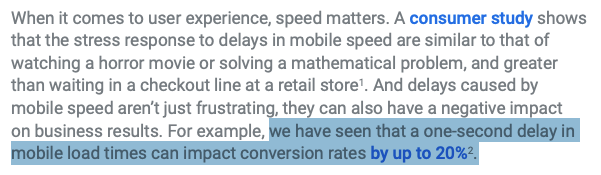
According to Google data, in a mobile environment, a 1-second delay in loading can impact conversion rates by up to 20%. A significant portion of customers looking for auto repair shops are searching on their phones in urgent situations. A slow page isn't just a frustrating experience — it leads directly to exits and lost business.
What Makes an Effective Landing Page
When people hear 'effective landing page,' they tend to think of things like:
-
Beautiful design
-
Convenient features
-
Polished copywriting
The bottom line: not at all. These are nice to have, but they're not what's required for conversion.
People looking for auto repair services want just two things:
-
Get trustworthy information quickly.
-
Contact you easily.
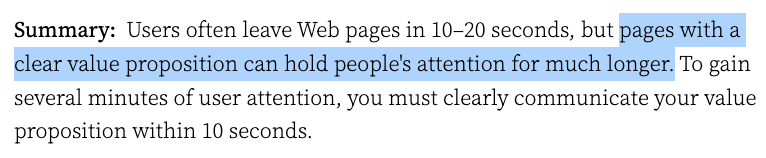
This is a principle repeatedly confirmed in user experience (UX) research. According to Nielsen Norman Group research, web visitors decide within an average of 10–20 seconds whether to stay or leave, and the deciding factor isn't beautiful design — it's whether what they're looking for is there.
There are countless techniques for building good landing pages on the internet — design, layout, colors, order, and so on. But there's no need to overthink it. All of those techniques ultimately exist to do these two things better. Understanding and applying these two things is enough.
How the Two Conditions Apply in a Real Landing Page
Let's look at how these two conditions are applied through an actual client's landing page.
1. Get trustworthy information quickly
The top section of a landing page is called the hero, or above-the-fold. Visitors need to be able to understand what this page is about within 3 seconds of seeing this hero section.
I include the following four elements in the hero section:
-
The headline tells them where they are.
-
The subheadline tells them why they should choose here.
-
The image helps provide an intuitive understanding of where they are.
-
The call-to-action button tells visitors what to do next.
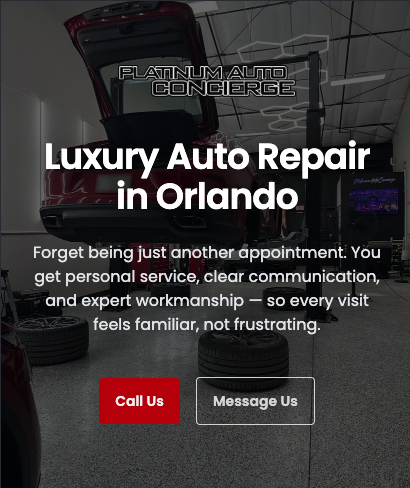
There's no single fixed format. What matters is that regardless of format, visitors recognize 'this is what I was looking for' within 3 seconds. If they see the hero and think 'let me scroll down and see more,' that's a success.
You might ask why specifically 3 seconds. According to Nielsen Norman Group research, users pay much more attention to the upper portion of the first screen when viewing a page, and a significant portion of viewing time is concentrated within the first two screens.

Visitors make an instant judgment the moment they open your page about whether it's what they're looking for, and if it doesn't feel right, they leave immediately. That's why the service, location, trust elements, and call-to-action button all need to be clearly visible in the first screen.
2. Contact you easily
A contact button is placed at the end of each major section. This is because different customers convert at different points. Some will call after reading about your differentiators, while others might want to send a message after reading customer reviews.
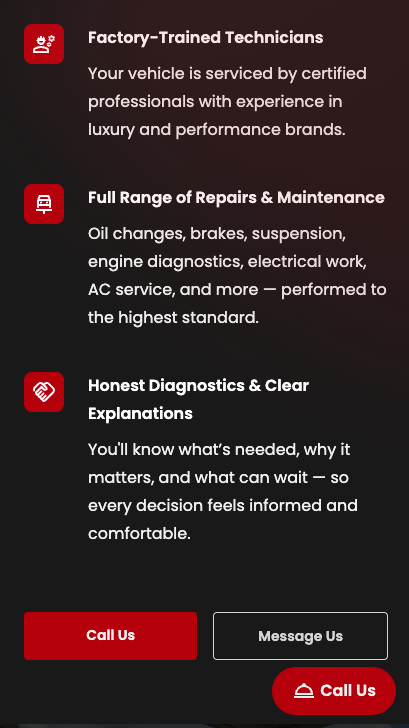
Next to the Call Us button there's also a Message Us button. This is for customers who prefer text communication over phone calls. In my experience, the number of customers who choose to submit a form instead of calling is much higher than you'd expect.
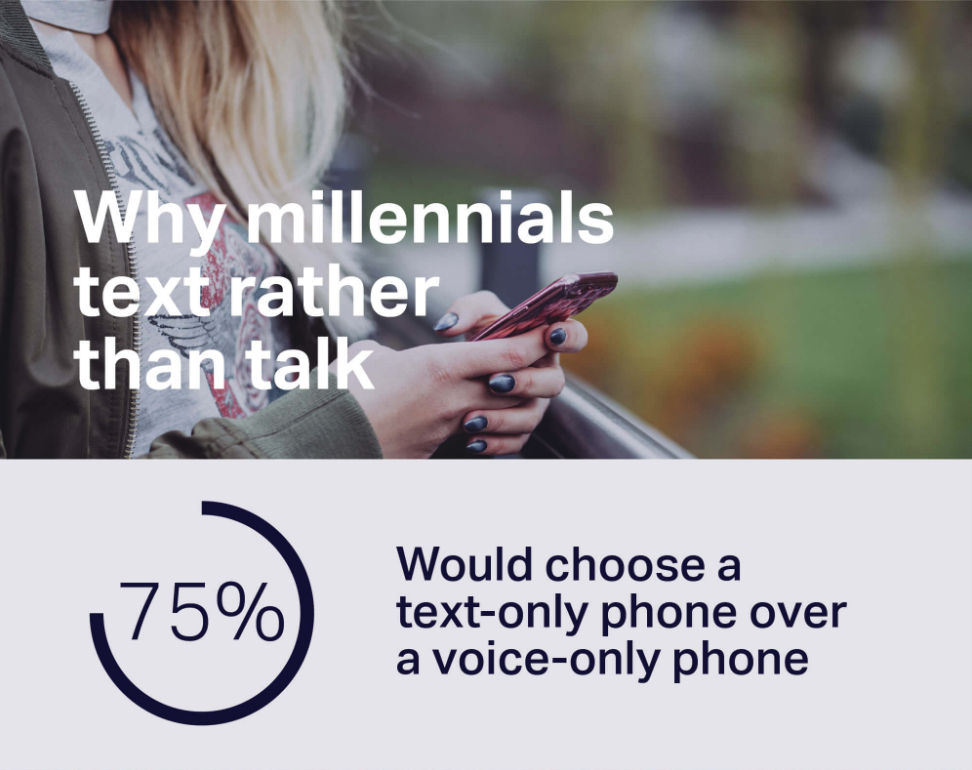
According to a consumer survey, approximately 75% of millennials prefer text messaging over phone calls. Limiting contact to one channel means losing customers.
In the lower right corner of the screen, there's also a Call Us button that stays fixed regardless of scroll position. This is so visitors can easily make a call whenever they want, no matter which section of the page they're on.
Conclusion
That's it.
"That's it? It feels like we haven't really learned how to set up keywords in detail, or how to write ad copy. What about design, section structure, and copywriting for the landing page?"
Fair point. Those parts were intentionally left out. The purpose of this guide is to get you to take action. Too much information causes cognitive overload and prevents you from even getting started.
This isn't just a feeling — it's a documented phenomenon. In his research Cognitive Load During Problem Solving: Effects on Learning, educational psychologist John Sweller found that when people are presented with more information than their working memory can handle, their ability to process and apply that information breaks down. The result isn't laziness or lack of motivation. The mental load itself becomes the obstacle.
Taking longer to act the more you learn isn't a willpower problem. It's a structural one.
So just understand the most important foundational principles and try to get even a small taste of ROI through direct execution. Landing page creation, domain setup, and Google Ads configuration can all be looked up when you get stuck. You'll find it's not as hard as you thought.
What you've learned here isn't just information — it's a way of thinking about Google Ads. Get the basics right, then figure out the rest as you go. You've already done the first part. That's all you need to get started.
FAQ
What's the difference between Google Ads and SEO?
Google Ads is immediate. The moment you turn on an ad, it shows up at the top of search results and can lead to clicks and calls right away. But the moment you turn it off, the exposure stops with it.
SEO takes time. It can take anywhere from a few weeks to several months to see results. But once you've established your position, customers keep coming in without ad spend. The two aren't competing approaches. Running Google Ads to secure short-term traffic while building SEO as a long-term asset is the most effective combined strategy.
Can I build a landing page and run Google Ads on my own?
Yes. Understanding just the basic concepts explained in this guide is enough to set things up and run them yourself. Rather than trying to do everything perfectly from the start, I recommend testing with a small budget. The key is repeating the cycle of setting a hypothesis, executing, reviewing results, and adjusting. Even if you fail, that experience builds up — and it means you'll be able to avoid getting overcharged if you ever hire a marketing agency.
How much does the average cost per click (CPC) run?
The average is approximately $3.90 according to WordStream. But that's an average. It can vary significantly depending on your area, level of competition, and type of service.
What's a good daily budget to start with?
I generally recommend starting at around $30/day. Too little and data doesn't accumulate. Too much and money just drains from a misconfigured setup. $30 is about the right level to secure a few clicks per day while testing performance. The key is starting small and gradually scaling up, not spending big from the start.